
Pyenv: Using Multiple Versions of Python on One System
How I used pyenv to resolve dependency issues in my Linux environment.

Hello world, I am Matt. In today’s post, I will share about how I used the pyenv program to make Python work for me. Well, more accurately, how I made multiple versions of python work for me.
Before we start, I want to let you know that, at the time this is releasing, I am getting ready to make a big push to make more linux content. Expect to see more Linux content on this page and maybe a revival of the YouTube channel with more Linux content to document my journey of getting good at Linux again. Now without further adieu, let’s get into pyenv.
The Original Problem
About a day ago (from the time of writing) I was attempting to set up my Linux environment for use with some of the programs I need for doing forensic analysis. This suite of programs consists of a few open-source programs that are useful for acquiring and parsing data. One such program was iLEAPP (which I have talked about before when I was doing CTFs). iLEAPP doesn’t have a way of running compiled executables, so I’m stuck having to run it on my own from the raw Python files.
Like many other Python programs, iLEAPP has its fair share of dependencies to resolve. It’s pretty easy to resolve dependencies most of the time, all I have to do is type the following into my terminal:
pip3 install -r requirements.txt and I will be able to fulfill all of the requirements. There have been special rare cases that I did not have a dependency that I needed to install as a package in the real system (ffmpeg, for instance) and point to in the PATH of the running environment. In that case, it was a more straightforward process than this was.
The process for getting this to work was a bit more convoluted.
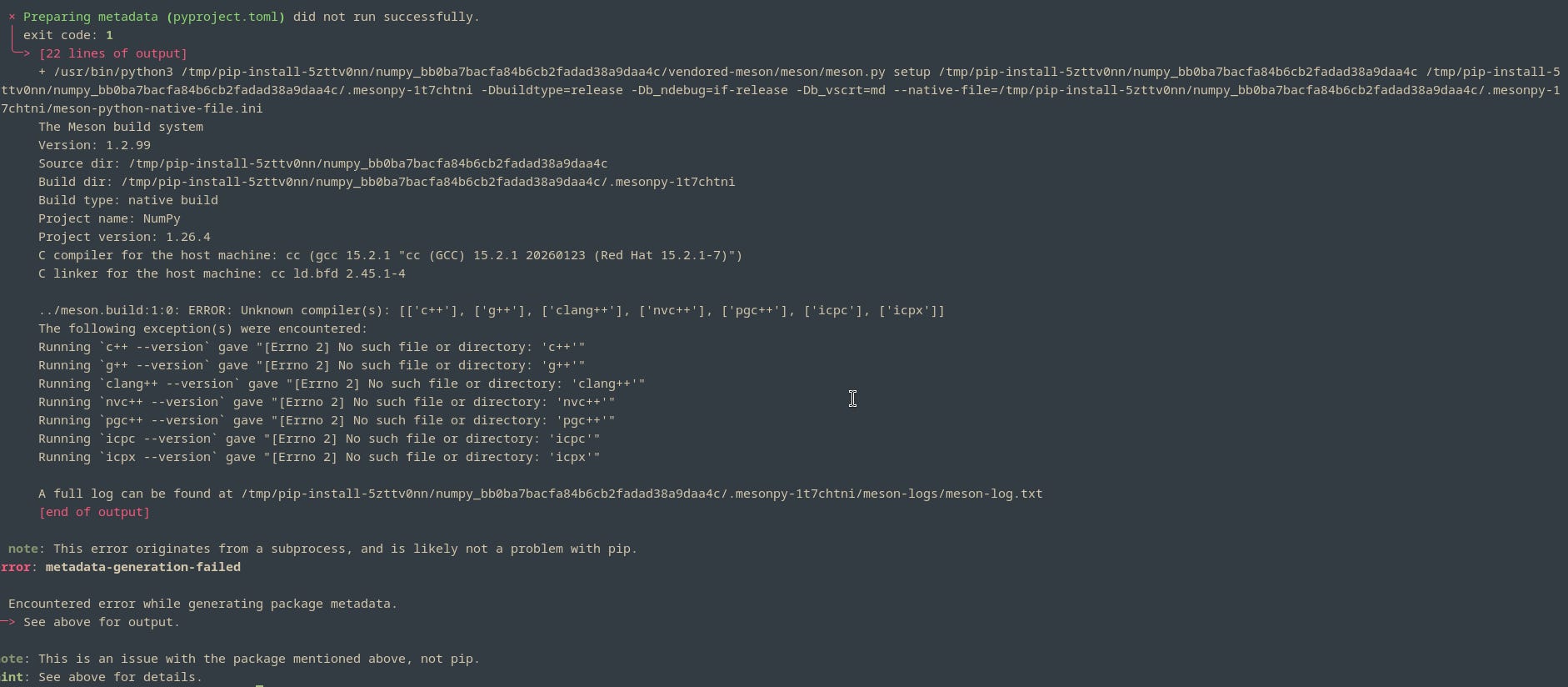
To not waste any more time, my problem was that some of the dependencies would not even build. It was telling me that one or more dependencies were unable to build the pyproject.toml metadata. This was strange since only two of these dependencies were not working correctly.
Now for the process of steps to come to pyenv.
The Two Things I Tried Before pyenv
There were two things I tried before pyenv: random online solutions and virtual environments. I also came to the solution of pyenv while researching virtual environments.
That said I encountered many online solutions telling me to do many things. Some told me to point the Python to my computer’s C++ compiler after checking whether it existed while others told me to download other developer libraries. I tried everything and ended up in the same place: not able to do anything. I was frustrated. So frustrated, in fact that I took a break. I needed to run some errands and meet a friend for a dinner, so it was fine. I came back later with another idea. I would try a virtual environment in the iLEAPP folder.
I didn’t get far into virtual environments before finding pyenv. I only had the chance to set one up with the commands below:
# Create a virtual environment
user@linux ~/Forensics/iLEAPP $python3 -m venv env
#Initialize the venv
user@linux ~/Forensics/iLEAPP $source env/bin/activate
This was straightforward to set up with these couple of lines. I now needed to figure out how to get pthon 3.12 in here. my instinct told me to just install it with my DNF package manager with the line below:
user@linux ~/Forensics/iLEAPP $sudo dnf install python312
This did pull in the correct Python 3.12 packages needed to execute to start this , but I did not think to go to the bin directories and copy them out to get them where I needed to, so I wasted time looking on YouTube for the answer to a problem which might have not been that big of a deal. It is what it is, though.
I came across a flashy video from NetwrkChuck about pyenv, which I followed along with. This is where the magic happened!
The Magic of pyenv
Pyenv is a GitHub project that is not part of the Red Hat package database (at least for now, hopefully) and can not be pulled in with
user@linux ~/Forensics/iLEAPP $sudo dnf install pyenvI had to get it from the GitHub page and do two things. First, I had to use the following command to pull in the binaries for pyenv
curl -fsSL https://pyenv.run | bash
I then added it to my environment variables to my environment with the following commands into my .bashrc file.
user@linux ~/Forensics/iLEAPP $echo ‘export PYENV_ROOT=”$HOME/.pyenv”’ >> ~/.bashrc
user@linux ~/Forensics/iLEAPP $echo ‘[[ -d $PYENV_ROOT/bin ]] && export PATH=”$PYENV_ROOT/bin:$PATH”’ >> ~/.bashrc
user@linux ~/Forensics/iLEAPP $echo ‘eval “$(pyenv init - bash)”’ >> ~/.bashrc
I had one more step after adding pyenv to my environments: I had to add python build dependencies by installing a few packages. It was easy. I had to add a single line to get this resolved.
user@linux ~/Forensics/iLEAPP $sudo dnf install make gcc patch zlib-devel bzip2 bzip2-devel readline-devel sqlite sqlite-devel openssl-devel tk8-devel libffi-devel xz-devel libuuid-devel gdbm-libs libnsl2And after that, I was good to start.
I had to start off with new Python install by typing the following command
user@linux ~/Forensics/iLEAPP $pyenv install 3.12Please note, if you need a list of the Python versions that pyenv can install for you, you can use the command
user@linux ~/Forensics/iLEAPP $pyenv install -lAfter I installed the pyenv Python 3.12, I had to activate it in the folder so I could try it and ensure that this was my solution. To use it in the folder I had to point it to the local folder with the command
user@linux ~/Forensics/iLEAPP $pyenv local 3.12This was what did it. After this and running the installation as above, I was able to get the installation of all dependencies to work flawlessly. I could then open iLEAPP as if I was looking at it on any other platform.
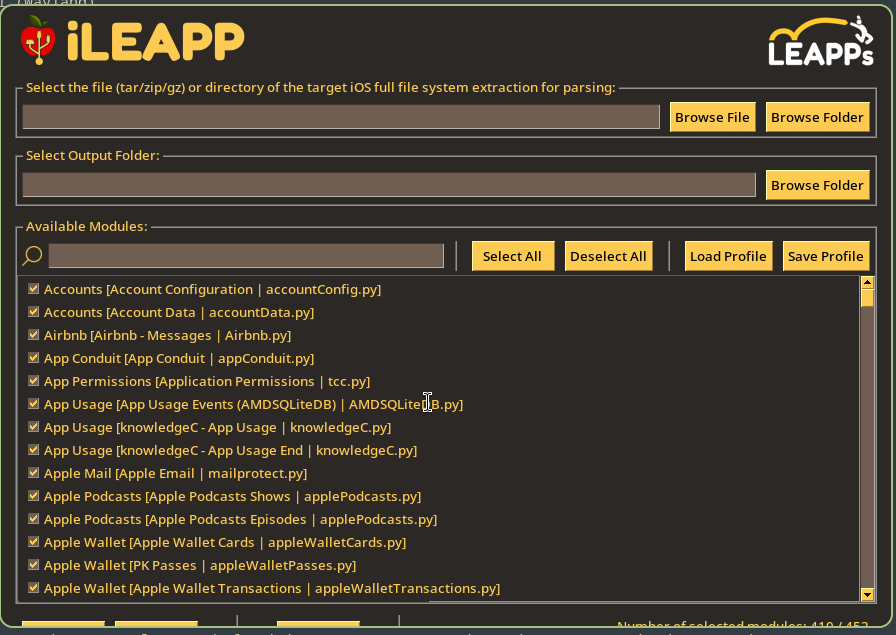
Everything else worked as expected. I was excited that I was able to solve the problem. Now hopefully I don’t run into too many other problems on my Linux environment.
Conclusion
So, in conclusion, I was able to solve some interesting Python dependency issues with a special Python tool called pyenv. This was very awesome and I’d really recommend it to other people on Linux. It is straightforward to use and it can help you to make things work with older (or newer) versions of python that are not your normal Python version.
That being said, I didn’t have much to say today and I am done with the commentary for the day. I hope you enjoyed and I’m going to call it a day here. So, this has been Matt, talking about Python and pyenv in Linux. Until next time, Matt OUT!