
Practical SQL Queries for Digital Forensics
How to start off with SQL Queries if you need to learn them for digital forensics

Hello World, this blog is a personal project that documents all of the cool things I do with my tech things at work and at play in my personal time. Because of this, it will continue to be free for anyone who might discover it. Some of the things documented here might be quite expensive for me to fund (like AI things and buying new hardware to test and document) and I’d like to subsidize it a little bit with this newsletter.
Please consider becoming a paid reader by donating via Stripe or buymeacoffee. Financial support will do a great job at helping subsidize small projects and will ensure you get better content in the future. I’m sure you will be satisfied with your decision to support this blog.
Hello world, it’s Matt and I’m back with another blog post. In this week’s post, I’ll talk shortly about SQL and how it relates to digital forensics. You may be familiar with this already, but if not, you have come across a good post. The post will go over concepts from the beginning of the concepts of SQL to the very details of its implementation. I’ll describe what a SQL database is, where they’re found and how to open and query them. In querying them, I will describe the easiest ways to query them and then I’ll get into more specific query types that will be useful to adapt to what you need.
SQL is a very useful tool for forensics precisely because it’s a (pretty much) universally agreed upon tool that you see used everywhere. From phones and tablets (especially those devices) to web browsers and other things, SQL is heavily used to store key data on many of the devices we rely on in our daily lives/ This is why it’s important to know how to use these databases in a forensic context.
What is an SQL File?
If you’re early on into forensics or any sort of data analytics career or paty, you may be unfamiliar with SQL as a format. In that case, I’ll relate it to a format that you might have used earlier on in your professional or personal life. Think of the Excel spreadsheet. That is the most common form of table-based data storage. An Excel file can contain multiple worksheets, each worksheet being a table with as many used columns as one needs to store the data they want to. An excel sheet can also be filtered in many ways, just like the data in an SQL file.
In many ways, SQL is superior to an excel spreadsheet. The most important way that SQL is superior to an excel spreadsheet is that it’s relational. This means that an SQL database can be easily manipulated to show relationships between data. While an excel spreadsheet can do similar things, an SQL database can be more easily manipulated. This manipulation comes from its property of having primary and foreign keys. Primary keys are the keys (usually an id column) that organize data. In the same way, foreign keys are identifiers that are the same type as the primary key and can be correlated with the primary key.
The second way that SQL databases are superior to Excel sheets is that they can be easily filtered through with functions called joins. A join is a function that one can use to combine data from one table with another table based on the relationships between keys. A practical example of this would be if we had a database table that had users of a service in one table and downloads on another. If we had similar primary and secondary keys, we can make a query that gives us the name of the user, their phone number, their address, and their internet plan, together with the total amount of data each user transferred via download and the data cap they have (among other things). That’s a powerful thing to do in many cases, especially when we’re looking at popular tables on phones and other devices that are of great forensic significance.
The SQL Query Language
SQL is old, very old. Compared to many of the languages that are popular today, it can be considered a “grandfather language”. It has been around since 1973, which makes it almost as old as C. SQL was originally designed for IBM’s System R database, which was a seminal work of relational database languages. SQL would go on to become the preferred relational database language over the next 5 decades, until now.
One reason SQL has become the preferred relational database is the ease of its language and its syntax. A simple example will be illustrated below1:
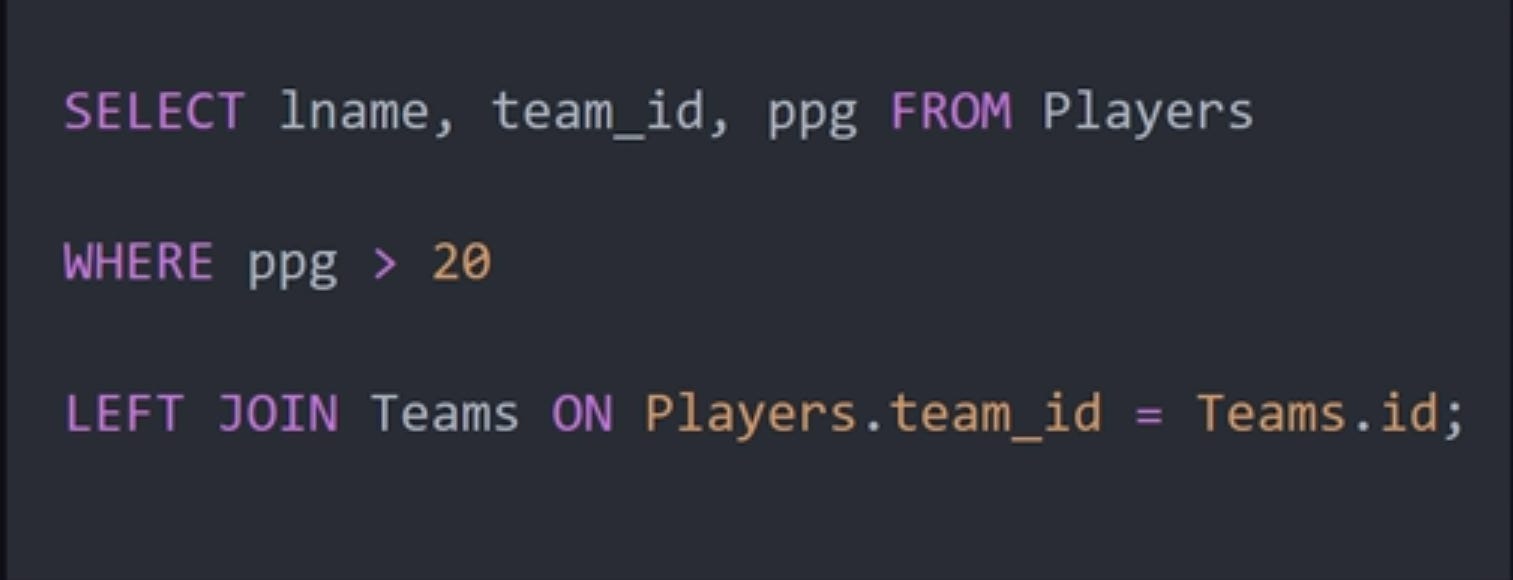
At its simplest form, we can see that an SQL query has a SELECT statement and a FROM statement. The SELECT statement tells the system what we want and the FROM says where we want to get it from.
The tokens that follow each of the two named parts are as follows: lname, team_id, and ppg are columns from the table(Players) that we are drawing form.
The WHERE clause on the next line shows us a condition we want to look for. In this case, any player with more than 20 points per game will be shown.
Next, the join line specifies the parameters that we will join the two (or more) tables we want to combine data from. In this case, we can see that the Players and Teams are joined. Additionally, the left join means that all rows from the left table are added and the matching ones from the right are added as well.
Practical Examples from iOS Forensics
Now that we understand the basic structure of SQL queries, let’s look at how SQL is actually used during a forensic examination. Modern iPhones contain dozens of SQLite databases that store information about messages, calls, web browsing activity, application usage, location data, and many other user activities.
Forensic examiners are always looking for relevant information to help them with their case, While they can, at times, just find data by inspection, they might not always have the ability to do that with the resources they have. They often have to show specific data that can only be found with an SQL query. The following sections show what can be found from the simplest queries to the most challenging and most difiicult ones.
Simple Query: Viewing All Records
On an iOS device, the most basic query that we can make is one that shows us an entire table. This is, in a way, redundant, but it’s worth mentioning to practice the syntax. If we were to use the messages table in the SMS database, (/private/var/mobile/Library/SMS/sms.db) the syntax would look like the following.
The message table contains individual SMS and iMessage records.
SELECT *
FROM message;
This query retrieves every column and every row in the message table. While this is not particularly useful for large databases, it allows an examiner to quickly understand the structure of the data and identify potentially important columns such as:
• text
• date
• date_read
• is_from_me
• handle_id
Many forensic examinations begin with this type of exploratory query.
Filtering Records with WHERE
Once we understand the structure of the table, we can begin filtering data. Suppose we want to identify only messages that contain the word “meeting.”
SELECT text, date
FROM message
WHERE text LIKE ‘%meeting%’;
The LIKE operator searches for text patterns. In this example, the percent symbols act as wildcards, meaning any message containing the word “meeting” will be returned.
This type of query is useful when searching for discussions related to specific events, locations, people, or criminal activities.
Filtering by Date
Investigations often focus on a specific time period. The following query retrieves messages sent after a certain timestamp.
SELECT text, date
FROM message
WHERE date > 700000000000000000;
The exact timestamp format depends on the database. Many Apple databases use Cocoa Core Time or nanosecond-based timestamps that require conversion before being interpreted by humans. this is usually done by dividing the number by 1000000000 and adding 978307200 to the result. The final calculation is compared against the Unix Epoch time (the number of seconds since 1/1/1970) to find the human-readable date.
This can be done with the following query:
SELECT datetime(date/1000000000 + 978307200, ‘unixepoch’) AS readable_time, text
FROM message
Investigators commonly use date filtering when reconstructing timelines around an incident.
Sorting Evidence
Frequently, we want to see the newest activity first.
SELECT text, date
FROM message
ORDER BY date DESC;
The DESC keyword sorts records from newest to oldest.
Similarly, ASC can be used to sort chronologically from oldest to newest.
Limiting Results
Large databases may contain hundreds of thousands of records. To quickly review recent activity, we can limit the number of returned rows.
SELECT text, date
FROM message
ORDER BY date DESC
LIMIT 25;
This query returns only the 25 most recent messages.
Combining Conditions
Real investigations rarely rely on a single condition.
SELECT text, date
FROM message
WHERE is_from_me = 0
AND text LIKE ‘%password%’;
This query returns incoming messages containing the word “password.”
The AND operator requires both conditions to be true.
The OR operator can be used when either condition is acceptable.
SELECT text, date
FROM message
WHERE text LIKE ‘%bank%’
OR text LIKE ‘%account%’;
Aggregation Queries
Aggregation functions allow us to summarize data.
For example, we can count how many messages exist within a database.
SELECT COUNT(*)
FROM message;
We can also count messages from a specific sender.
SELECT handle_id,
COUNT(*) AS Message_Count
FROM message
GROUP BY handle_id;
This query helps identify the most active contacts associated with a device.
Working with Safari History
Another common forensic artifact is Safari browsing history.
Safari stores browsing information within:
/private/var/mobile/Library/Safari/History.db
To retrieve recently visited websites:
SELECT url, visit_time
FROM history_visits
ORDER BY visit_time DESC
LIMIT 50;
This query can quickly reveal websites accessed immediately before or after an incident.
Joining Tables: Connecting Messages to Contacts
The true power of SQL becomes apparent when we begin joining tables together.
Within sms.db, the message table stores messages while the handle table stores information about the associated phone numbers and Apple IDs.
SELECT message.text, handle.id, message.date
FROM message
JOIN handle ON message.handle_id = handle.ROWID
ORDER BY message.date DESC;
This query links messages with the actual contact information associated with them.
Without the join, the examiner would only see numerical identifiers rather than meaningful contact information.
Timeline Reconstruction
One of the most common forensic tasks is creating a timeline.
SELECT datetime(date/1000000000 + 978307200,‘unixepoch’) AS Message_Time, text
FROM message
ORDER BY date ASC;
This query converts Apple’s timestamp into a human-readable format and orders the results chronologically.
Timeline reconstruction is frequently used in incident response, criminal investigations, and civil litigation.
Correlating Multiple Data Sources
Advanced investigations often require correlating information across multiple databases.
For example, an examiner may want to compare web browsing activity from History.db with message activity from sms.db and application usage information from KnowledgeC.db.
While these databases are often analyzed separately, exporting their results and combining them through SQL joins can help establish relationships between:
• Messages sent
• Websites visited
• Applications opened
• Device locations
• User interactions
This type of correlation can reveal behavior patterns that may not be obvious when examining artifacts individually.
Subqueries for Advanced Analysis
Subqueries allow one query to be embedded inside another.
Suppose we want to identify the contact who exchanged the most messages with the device owner.
SELECT id
FROM handle
WHERE ROWID = (SELECT handle_id FROM message
GROUP BY handle_id
ORDER BY COUNT(*) DESC
LIMIT 1
);
This query first identifies the most active handle_id and then retrieves the associated contact information.
Subqueries are particularly useful when performing behavioral analysis and identifying key actors within a dataset.
Conclusion
SQL is one of the most important technical skills a forensic examiner can develop. Nearly every modern smartphone, web browser, and application stores critical evidence in SQLite databases. Understanding how to progress from simple SELECT statements to joins, aggregations, timeline analysis, and subqueries enables investigators to move beyond basic artifact viewing and begin conducting meaningful forensic analysis.
The examples shown here only scratch the surface of what is possible. As you become more comfortable with SQL, you will find that many forensic challenges can be solved more efficiently with a well-crafted query than through manual examination alone.