
Getting Back on the Mac
Practicing Mac forensics again with an old CTF image.

Before reading this post, please note that the material for this post is several years old. I am bothering to write this post because I want there to be a larger presence of MacOS forensics resources on my Substack.
This post details an old CTF from Magnet Forensics using the tools that I have access to. Others like Kevin Pagano of Stark4N6 have done this using other software I do not have access to, like Magnet and Cellebrite. I will use the following tools to complete this:
1. Command line (Windows)
2. Notepad
3. Belkasoft X
4. DBBrowser for SQLite
5. Mushy by Ian Whiffin
At the end of each challenge, I will compare each answer that I obtain with the one that Kevin obtained in his report.
Hello Internet, I am excited to be beginning my 2026 line of posts. I hope to start this year off well and fill it with a great deal of MacOS and mobile forensics posts. To start that off, I will be presenting a post on a very old CTF I did not play in: the Magnet Virtual Summit CTF from 2021. I will add answers and reasoning for each question and then verify with Kevin Pagano’s (Stark4n6) answer to verify I am on the right track. He mainly uses Magnet Forensics in his post, which I do not have. I want to show my tools being used and share how you can do it on your own without expensive tools.
Let’s get started!

[1] Call me by your name
What is the Local Host Name of this device?
This is an easy one. I initially forgot where exactly to find this one. It turns out that it’s undet the preferences.PLIST under /LibraryPreferences/SystemConfiguration/. It’s specifically located in the “LocalHostNames” key in the “Network” Key Dictionary inside this PLIST file.
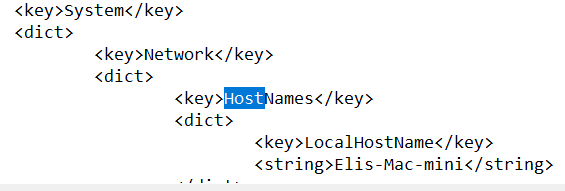
The name “Elis-Mac-mini” is verified by Kevin, so that’s one success.
[2] I love it when you call me big sur
What is the Product Build Version?
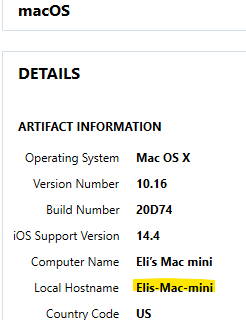
The product Build number can be seen in the previous image. It is 20D74.
Note that something interesting happens with the image in Belkasoft: it shows not only the current system version, but all of the updates available. The one we want is located in /System/Library/CoreServices/SystemVersion.plist. The others are located in /System/Library/AssetsV2/com_apple_MobileAsset_MacSoftwareUpdate/ and other related folders.
[3] Whose got your back (up)?
What is the IMEI of the iOS device that is backed up?
The phone that was backed up is 356759080486567 This can be found in the iTunes backup directory at /Users/eliflatt/Library/Application Support/MobileSync/Backup/518e8d766f9b3e76db216f35fdb6b0604e50f61b/ in the info.plist file. It is located in the IMEI key towards the bottom of the file. It is shown in the image below.
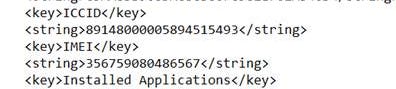
The info is confirmed by Kevin’s post.

[4] Bottoms up, and the devil laughs
What is Eli’s preferred energy drink brand?
For this one, I used DBBrowser for SQLite. I didn’t know what brands there were, so I looked in the Safari history for “Energy Drink.” This is located in the following path: /Users/eliflatt/Library/Safari/History.db. The following three results came up in the links area of the history_items table.

I then went to the link and found this title:

The answer is Bang.
This is confirmed by Kevin:

It’s interesting to see how posts change over the years!
[5] LaxBro
Which college lacrosse team schedule did Eli often look at?
The answer is University of Albany. It is found in the same place as the above energy Drink question.

Kevin Confirms this with his assessment that there were more than three instances of “University of Albany”.
[6] Stop playing with me
How many websites have permissions to autoplay?
I took a quick look at the folder that contained the Safari history item from the last challenge question and realized it had a PLIST file quite conveniently named “SitesAllowedToAutoplay.plist.” I looked into this file, first in notepad. It turns out that this is encoded in a binary PLIST format and cannot be read easily by Notepad in Windows.
This told me that I needed to open it in some program that can handle BPLISTS. I use Ian Whiffin’s Mushy for BPLISTs, so I opened it with that. It turns out that it is a 0-indexed list that goes to 164 as its last entry

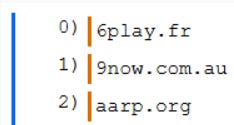
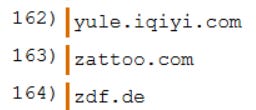
This makes 165 entries.
Kevin’s post confirms this.
[7] Finder’s Keepers
What Source Version is the Finder app on this device?
For this one, I didn’t know what I was actually looking for. I first looked for PLIST files that contained “Finder” in their names. Nothing revealed a version number. After that I looked for a folder with “Finder” in its name. It just so happened there was a search result for “finder.app” that had something inside it. When I delved deeper, I found a file called “version.plist” under the /System/Volumes/Update/mnt1/System/Library/CoreServices/Finder.app/Contents/version.plist” that had multiple version labels.
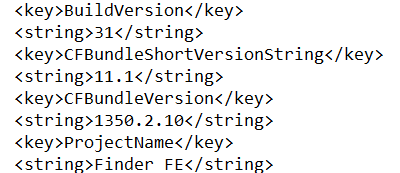
This is the point where I would have panicked and started guessing if it was a real CTF. I would have tried 11.1, then 1350.2.10 and finally 13. It turns out that, from Kevin’s post, the correct answer is the CFBundleVersion, or 1350.2.10!
[8] it’s raining it’s pouring
What is the size in bytes of the application found within Eli’s trash?
In MacOS, a user’s trash is contained within a hidden folder called “.Trash” under their user home folder. We can find that folder in our image by navigating to /Users/eliflatt/.Trash. running ls on that directory proves that there is, in fact, an application in this folder. It is called “checkra1n beta 0.12.2.dmg”. For those of you who are not familiar with Mac, DMGs are the Mac equivalent of exe files on Windows.
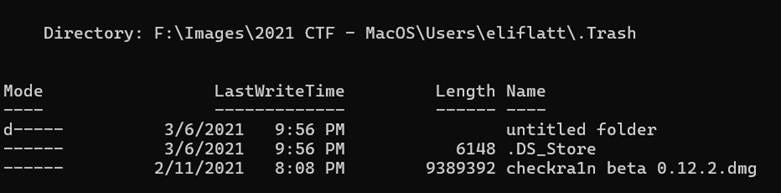
I see from the “length” field on this description that the file is 9389392 bytes long, which matches Kevin’s answer.
[9] Oh Sheet!
What is the name of the spreadsheet Eli often navigated to?
I couldn’t find any useful spreadsheets stored locally on the machine. After scouring the machine, I decided to look in the web history for links with “spreadsheets”, “documents,” “docs”, or any related name. I found three possible matches.

One showed up 60 times, which prompted me to look further into it for a name. I found such name in the “history_visits” table.
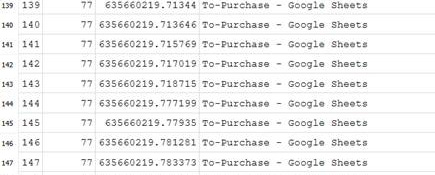
The correct name is “To Purchase,” as confirmed by Kevin’s answer.
[10] Remind me Later
What time and date in EST did Eli add a notification permission on Safari? (Format: MM/DD/YYYY HH:MM:SS)
To answer this one, I looked for files that delat with Safari and notifications. I realized that there was a file in the same folder as he history file that was called “UserNotificationPermissions.plist”. I opened this file in Notepad, but it was, again, a binary PLIST. This meant Mushy.
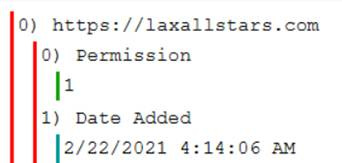
That output was fine, but I needed to convert it. It converted out to: 02/22/2021 04:14:06
I’d have kept it that way. Come to find out that it’s in UTC. This means that I have to roll it back either 4 or 5 hours. Since February is within the “Fall Back” range of DST, I rolled it back 5 hours to: 02/22/2021 04:14:06, which matched Kevin’s answer.
[11] Secrets Secrets are no fun
What is Eli’s system password hint?
At first, I didn’t know how to do this one. If I were part of the CTF and I was playing it, I would have outright skipped it. As a result, I did this question after 13 and 14. I ended up referencing the answer because the resources I had did not show where to find it on a system this old.
When I referenced the answer, I saw that the PLIST in the answer and located it in the file system. It lies in /System/Volumes/Preboot/943CAEE3-8306-426A-A65E-4E0F4B52EBDB/var/db/CryptoUserInfo.plist.
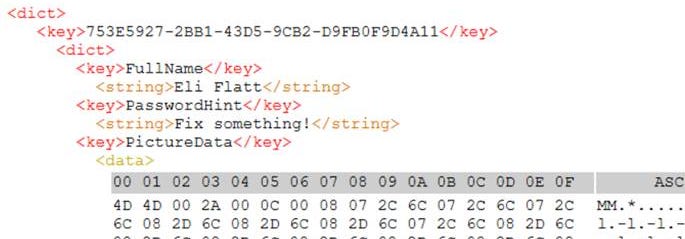
It is “Fix Something” and is confirmed by Kevin’s work.
[12] There are no penguins at the North Pole
What is the SHA1 hash of Eli’s profile picture on the device?
The picture above shows the first few bytes of the image of the penguin image. I tried to hash it, but did not find the correct hash. I looked for it in the file system and found a penguin.tif image that had a matching signature and bytes. I tried hashing that one and I still could not get the correct one.
I will keep trying and report back. This is the correct hash.

[13] WallStreetBet You Can’t Get This One
Eli searched for 4 stock quotes (not a web search). What was the second stock he searched for? (Answer in ticker form, e.g., $MVS)
Since this is not a web search, the only two apps I could think of that can search stocks are Apple Stocks and something like Robin Hood. I ruled out RobinHood after searching further. I used my file system search to find “stocks” files and folders in the file system. I found a folder called com.apple.stocks and proceeded with that one.
I was not sure where to look in this folder, but I expected this to be in some sort of SQLite database. I looked through the files and found one database that looked promising. You can miss it easily, like I did the first time. It is just called cache-database. It is located within /Users/eliflatt/Library/Containers/com.apple.stocks\Data/Library/Caches/.
This database had five tables: baseline_viewing_history, quote_details, quotes, stock_metadata, and table_versions. This data is within the quote_details table.
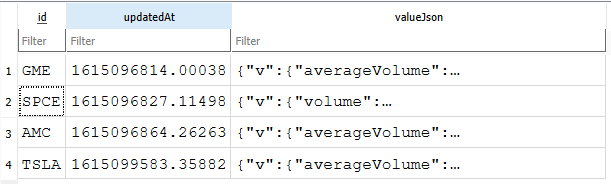
The second quote is for $SPCE, which matches the answer Kevin gives.
[14] Where are my keys!?
What is the encryption-key for Eli’s iCloud (SHA256)?
And for the final question, we have the iCloud keys. This was a fun one for me. I originally thought it was in the System pathway, but I realized that the Keychain is located with the User data. This meant that I had to go down into /Users/eliflatt/Library/Keychains/ 622523FF-A9E8-5BFC-9142-B14980A33465 within the Keychain2.db file.
This was the end of my definite knowledge of the parts of this problem. I did not know where the correct key would be, so I looked for places where it could be.
Within the table marked as ckdevicestate, there is a column where there are keys. This column is called “octagonpeerid”. I quessed that iCloud stuff was something related to Device Pairing or Applications. It turned out that it is under Device Pairing. With this in mind, I looked at the keys for the two instances of the Device Pairing in the column named ckzone. There were two devices with this identifier, so I chose the Mac

The following hash is the SHA256 hash of the MacOS device.
fUpf9J+cLRI3OCJ/KdFpZoaZXgfj2DC3ZrQnW7XT9Os=
Conclusion
And that’s a wrap! Before I go, I have to say a couple of things. First off, this is a situation where I don’t mind using Microsoft Copilot for starting off. I grabbed all of the challenge titles and questions using Copilot so I wouldn’t have to look at the answers. Secondly, I have to say this is pretty good experimentation, but I don’t know how accurate this is for modern MacOS. Some of the artifacts changed locations after MacOS 10.6, so this might have limited utility in some cases. In others, it should be fine.
Overall, I thought this set of CTF challenges was fine. Not too hard, and just slightly too easy for my skill level at the moment. It should be cool to look at this image some more and see more about what was happening with the story in the CTF and how it related to the other devices.
As always, forensics is very engaging when you think about what’s on these devices, how this material is articulated, and how it’s locater in relation to other materials. I can’t wait to do more Mac stuff and I hope to see more modern Mac analysis in future CTFs.
This has been Matt talking to you about some old Mac forensics CTF images. Until next time, Matt OUT!